
I was going fast. The CSS wasn't clean, hardcoded values scattered everywhere, z-indexes pulled from thin air, the same orange hex repeated in five files. I told myself I'd fix it later.
Then I came across Hardik Pandya's article on exposing your design system to LLMs. "Later" finally had a method.
Pandya's piece genuinely shifted how I think about design systems in an AI workflow. From "documentation designers maintain" to "constraints AI agents read at session start". Everything below is built on top of that shift. It's not a review of the prompt (which works exactly as described), but a look at the four things I had to fix manually after running it.
The problem: the AI doesn't read your variables
My site is built with Nuxt + SCSS + Claude Code. I'd done the right things upfront: a spacing scale, named colors, a radius system. My _variables.scss was tidy. None of it was being used.
When you describe components to an AI in natural language, the AI doesn't go look up your tokens. It writes what seems reasonable. z-index: 2. padding: 14px. #ff6b35, even though $color-primary is sitting right there in the variables file. Each choice looks fine in isolation. Together, it's silent inconsistency, the kind you feel before you can name it.
Running Pandya's audit across 27 files confirmed it: ~350 hardcoded values. My primary orange appearing 5 times as a raw hex. 55+ unique pixel spacing values. 30+ raw z-indexes, none referencing my defined scale.
I ran the same audit on a client project, Vue 3 + Vuetify with a Storybook design system: 257 violations across 23 files, the same gray palette copy-pasted into 8+ components, !important flags where the AI couldn't navigate the cascade.
The AI rewrites what it sees, not what you defined.
The fix: one agent session
Pandya's prompt does the whole thing in one pass: audit, build a tokens.css with three-layer indirection, generate spec files for every component, write a CI-ready audit script, replace every hardcoded value, and produce a CLAUDE.md that future sessions will read at session start. It's all in his article, worth reading in full.
On my site: 20 files modified, 230+ custom properties, 8 component specs, zero violations on final audit. Under an hour. Visually identical, which is the point.
What changes is the next session — the constraint is now structural, not willpower-based.
But the interesting part isn't the run. It's what I found in the output.
What the cleanup revealed: context is everything
Here's where it gets interesting.
The prompt produced a clean, passing audit. Zero violations. But looking at the generated tokens, I found a different kind of problem: the AI had sometimes tokenized the wrong things.
Watch out for #1: Near-duplicate tokens.
In _variables.scss, Claude Code added:
$color-bg-card-glass: rgba($color-white, 0.6);
$color-bg-card-glass-header: rgba($color-white, 0.565);
A difference of 0.035 opacity, invisible to any human eye. Two separate variables, used in a single component each. The AI found two slightly different values in the original code and dutifully tokenized both instead of consolidating them. A designer rounds one to match the other and moves on.
Rule of thumb: if a token is used in fewer than two places, it probably shouldn't be a token.
Watch out for #2: Tokenizing local hacks as global system decisions.
The audit found 30+ raw z-index values, so Claude Code generated a full scale:
$z-behind: -1;
$z-below: 0;
$z-base: 1;
$z-raised: 2;
$z-dropdown: 100;
$z-sticky: 200;
$z-fixed: 300;
$z-modal-backdrop: 400;
$z-modal: 500;
$z-tooltip: 600;
$z-lightbox: 9999;
Looks systematic. But it conflates two completely different things: intra-component stacking (-1, 0, 1, 2) and global UI layers (100+). The low values aren't design decisions, they're local implementation details. A developer writing z-index: 1 inline is perfectly readable. Tokenizing it adds noise, not clarity.
For a landing page, four tokens are enough:
$z-sticky: 100; // sticky nav
$z-dropdown: 200; // menus, tooltips
$z-modal: 400; // modals
$z-toast: 500; // notifications
The AI generated 11 because it found 11 distinct values. It had no way to distinguish "local stacking hack" from "meaningful UI layer." That distinction is design judgment.
Watch out for #3: Component-specific values promoted to global tokens.
The generated file mixed a clean generic scale with single-use contextual tokens:
$color-dot-red: #ff5f57; // macOS traffic light, used in 1 component
$color-quote-icon: #f5f0e8; // a single decorative element
$shadow-lightbox: ...; // one overlay
$shadow-btn-glow: ...; // one button state
These don't belong in a global design system file. They belong in their component's own SCSS. A global token should be reusable across at least 3 different components, otherwise it's just a variable with extra steps.
The same applies to hardcoded pixel values in complex components. A top: -2px for optical icon alignment, a transform: translateY(-120%) in a CSS animation, a width: 1px separator, these are implementation details, not design decisions. Forcing them into tokens creates more confusion than clarity.
Watch out for #4: The prompt assumes one specific stack.
The prompt creates a tokens.css file with CSS custom properties, which is the right answer for a vanilla CSS or React+CSS project. But every modern frontend has its own token format: SCSS variables, Less, Tailwind config, CSS-in-JS theme objects, Vuetify theme, Material UI palette. These aren't interchangeable.
My site uses SCSS. I already had _variables.scss with a working set of variables. The prompt didn't migrate them, it built a second layer on top in a different format:
/* _variables.scss, what I already had */
$color-gray-100: #f5f5f5;

/* tokens.css, what the prompt created */
--primitive-gray-100: #f5f5f5;
Does it actually work for the next session?
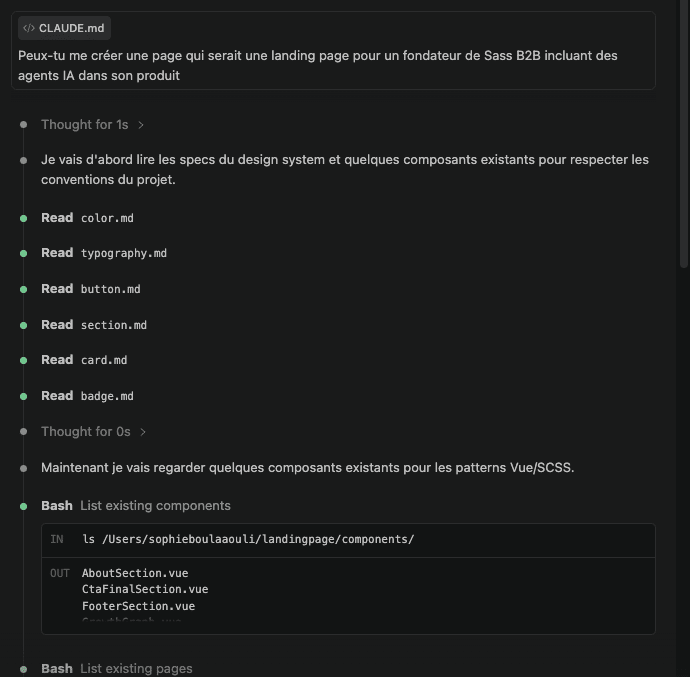
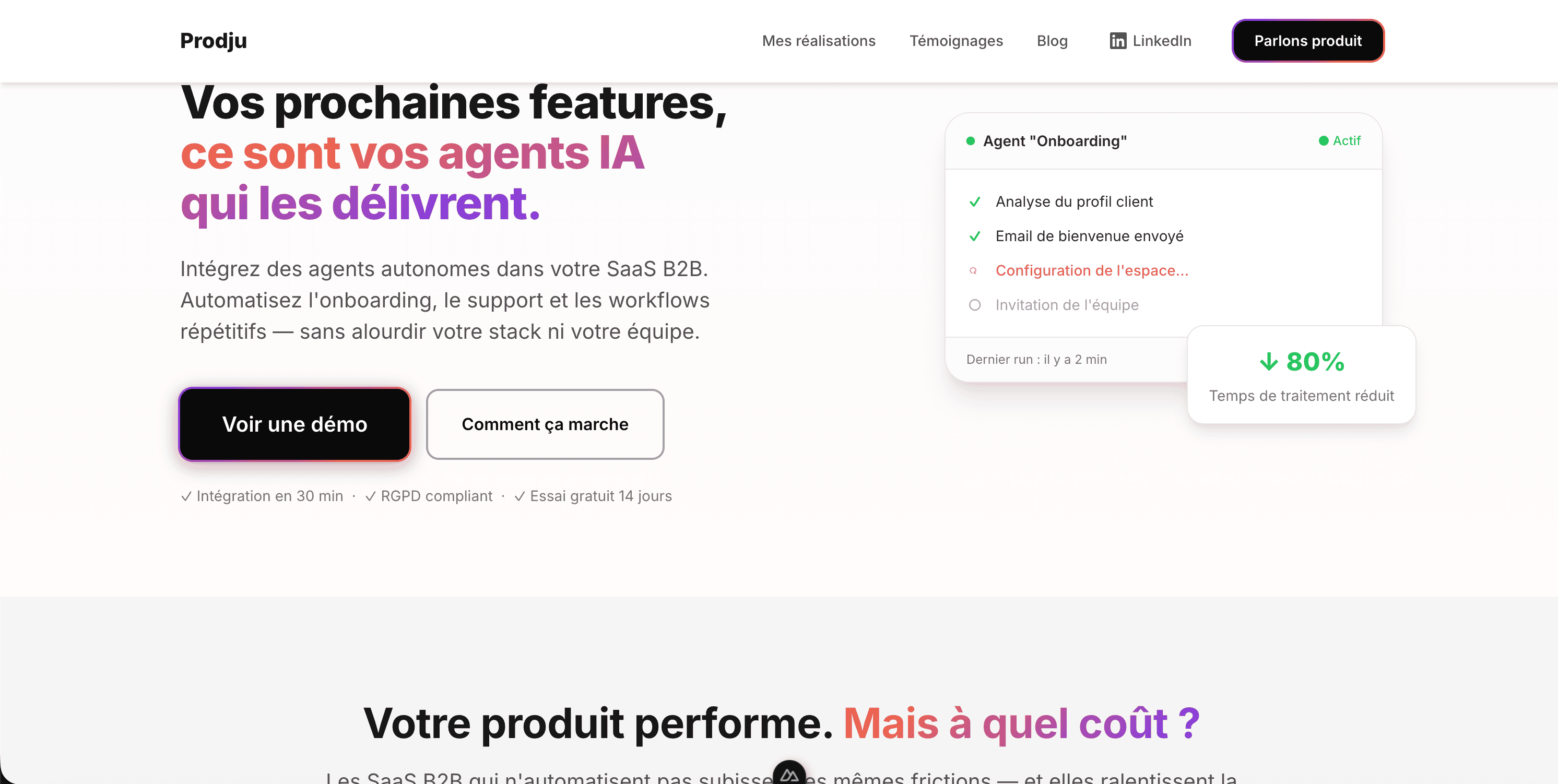
To test it, I asked Claude Code to generate a brand new landing page from scratch, one prompt, no additional instructions.
Before writing a single line of code, it automatically read color.md, typography.md, button.md, card.md, badge.md, the spec files generated by the prompt. It listed existing components, checked the patterns, then built.
The result used the right tokens, the right components, the right visual language. Same orange, same typography, same card style as the rest of the site. No drift. No guessing.
That's what the whole setup is for.
What this means
The prompt is excellent. It solved the real problem, inconsistency across sessions, and it works exactly as described. Run it, commit the result, and future AI sessions will produce consistent output.
A design system is encoded thinking: the decision to name something --color-link instead of --blue-500 encodes intent, not just value. The decision to have four z-index layers instead of eleven reflects an understanding of how the UI is actually structured. The decision to keep a one-off shadow inline rather than tokenizing it keeps the global file readable.
The AI tokenizes what it finds. It can't decide what should be tokenized.
That's where knowing both sides matters. A pure designer wouldn't catch the over-tokenized z-index scale. A pure developer might not question whether 0.565 and 0.6 opacity are the same design intent. Reading the generated output critically, as someone who understands both the design decision and the code it produces, is what makes the difference between a passing audit and an actual design system.
That's the designer-developer's job. And in an AI-assisted workflow, it turns out to be the most durable contribution you can make.
The prompt used in this article is from Hardik Pandya's piece on LLM design systems. Worth reading in full if you want the technical depth.
Working on an AI-assisted product?
30 minutes to talk about design system structure, token strategy, or your product design challenges.